Linux Cgroups 学习笔记
cgroups学习笔记
一、名词解释
- hierarchy 类似文件书树的树形结构,树上的节点表示cgroup,hierarchy与一个或多个subsystem,即资源控制器关联,子节点的资源不能超过父节点的资源限制
- cgroup 树形结构上的节点,表示共享资源限制的一组task
- task cgroup中的进程
- subsystem 资源控制器,控制不同系统硬件资源
- blkio 限制对磁盘,固态硬盘,usb等存储设备的访问速率
- cpu 限制cpu时间片占比
- cpuacct 生成cgroup中进程(task)的cpu资源使用情况
- cpuset 将独立的cpu和内存结点分配给cgroup
- devices 控制cgroup对设备的访问权限
- freezer 挂起或恢复cgroup中进程
- memory 限制cgroup的内存使用限制并生成使用情况报告
- net_cls 给网络包打赏标签classid,用于区分不同cgroup的网络包
- net_prio 动态设置网络流量的优先级
- ns namespace subsystem,后续单独讲到
- perf_event 识别task所属的cgroup,并用于性能分析
二、hierarchy、cgroup、subsystem、task的规则
| 规则 | 示意图 |
|---|---|
| 同一个hierarchy可以关联多个subsystem | 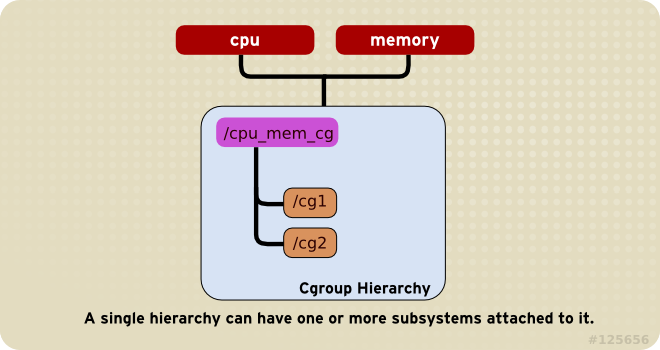 |
| 一个subsystem不能同时关联到两个hierarchy上,前提是其中任意一个已经关联了一个subsystem | 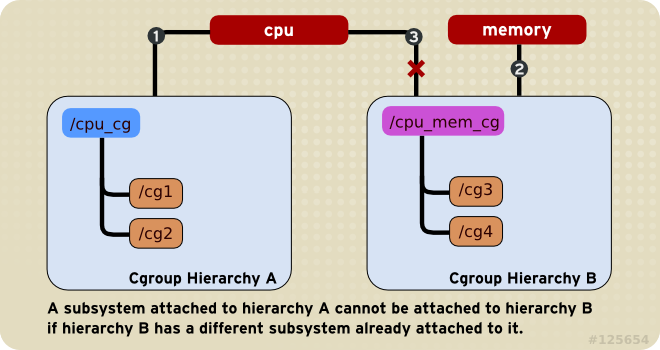 |
| 一个task可以同时是两个hierarchy中的cgroup的成员,但不能同时是同一个hierarchy中两个cgroup的成员 | 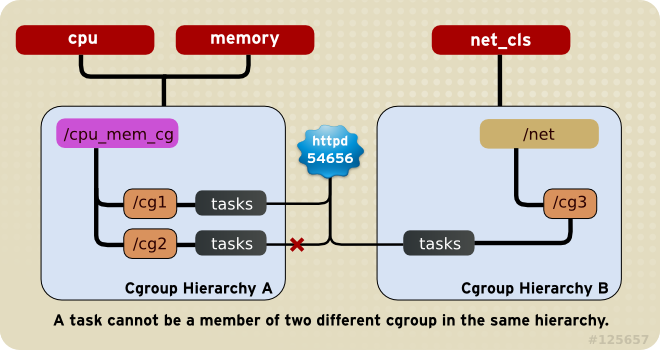 |
| 进程fork出的子进程继承原进程的cgroup设置,fork完成后可独立修改 | 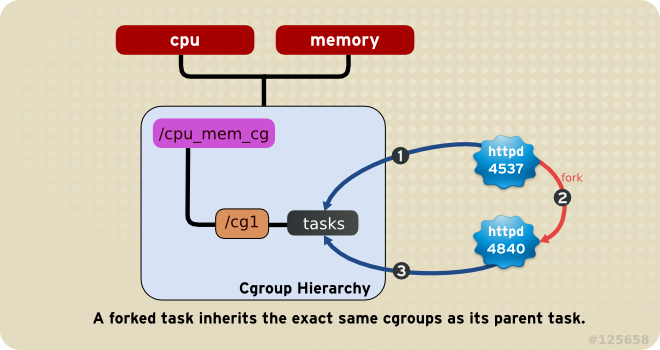 |
上述规则带来的结果:
- 由于一个task在一个hierarchy内只能属于一个cgroup,也就意味着这个hierarchy关联的资源控制器对于这个task只有一种限制方式
- 可以将多个subsystem组合在一起对一个hierarchy起作用
- 可以将一个hierarchy关联的多个subsystem拆分出去并关联其他的hierarchy,类似的也可以进行合并
- 可以对一个task在所有subsystem管理的资源上进行指定的配置
三、cgroups的使用
通过安装libcgroup可以方便的配置cgroups。cgconfig服务利用/etc/cgconfig.conf配置文件和/etc/cgconfig.d/文件夹中的配置文件控制hierarchy的创建,subsystem的关联,cgroup的创建。
hierarchy的挂载示例如下:
1 | mount { |
cgroup创建的示例如下:
1 | group daemons { |
lssubsys命令可以列出所有subsystem以及其目前关联的hierarchy。
使用mount命令控制subsystem与hierarchy的关联,包括新增,删除等。
使用unmount可以删掉hierarchy,使用cgclear可以在hierarchy仍然有cgroup的情况下将其删除。
其他命令不再赘述,可参考参考资料。
四、subsystem调参
由于subsystem数量较多,下面主要写一下cpu和memory这两个。
4.1 cpu
假设现有一个叫/cgroup/cpu的hierarchy,关联了cpu subsyatem。
限制一个cgroup使用25%cpu,另一个cgroup使用75%cpu,示例如下:
1 | echo 250 > /cgroup/cpu/blue/cpu.shares |
限制一个cgroup使用整个cpu示例如下:
1 | echo 10000 > /cgroup/cpu/red/cpu.cfs_quota_us |
限制一个cgroup使用单个cpu的10%示例如下
1 | echo 10000 > /cgroup/cpu/red/cpu.cfs_quota_us |
在多核机器上允许一个cgroup使用两个cpu示例如下:
1 | echo 200000 > /cgroup/cpu/red/cpu.cfs_quota_us |
4.2 memory
下面的示例展示在一个限制了memory使用上限的cgroup中的进程如何被oom killer杀死并发送通知的。
创建一个cgroup并关联memory subsystem
1
2mount -t cgroup -o memory memory /cgroup/memory
mkdir /cgroup/memory/blue设置cgroup中的进程使用内存的上线为100m
1
echo 104857600 > memory.limit_in_bytes
进入cgroup目录确认oom killer已开启
1
2
3
4cd /cgroup/memory/blue
cat memory.oom_control
oom_kill_disable 0
under_oom 0将当前shell进程移动至cgroup中的tasks文件中,这样在这个shell中启动的程序就自动加入了这个cgroup
1
blue]# echo $$ > tasks
启动一个测试程序,测试程序尝试分配大量内存超出限制。一旦达到cgroup的内存上线就会被oom killer杀死。
1
2~/mem-hog
Killed测试程序如下:
1
2
3
4
5
6
7
8
9
10
11
12
13
14
15
16
17
18
19
20
21
22
23
24
25
26
27
28
29
30
int main(int argc, char *argv[])
{
char *p;
again:
while ((p = (char *)malloc(GB)))
memset(p, 0, GB);
while ((p = (char *)malloc(MB)))
memset(p, 0, MB);
while ((p = (char *)malloc(KB)))
memset(p, 0,
KB);
sleep(1);
goto again;
return 0;
}关闭oom killer,然后再启动测试程序,测试程序用完内存后会一直暂停,直到有新的可用内存出现
1
2echo 1 > memory.oom_control
~/mem-hog尽管测试程序没有被杀死,但cgroup的under_oom状态已经表明达到了内存上限。重新启动oom killer会将测试进程立刻杀死
1
2
3cat /cgroup/memory/blue/memory.oom_control
oom_kill_disable 1
under_oom 1为了获得oom的通知,创建一个接收通知的程序oom_notification
1
2
3
4
5
6
7
8
9
10
11
12
13
14
15
16
17
18
19
20
21
22
23
24
25
26
27
28
29
30
31
32
33
34
35
36
37
38
39
40
41
42
43
44
45
46
47
48
49
50
51
52
53
54
55
56
57
58
59
static inline void die(const char *msg)
{
fprintf(stderr, "error: %s: %s(%d)\n", msg, strerror(errno), errno);
exit(EXIT_FAILURE);
}
static inline void usage(void)
{
fprintf(stderr, "usage: oom_eventfd_test <cgroup.event_control> <memory.oom_control>\n");
exit(EXIT_FAILURE);
}
int main(int argc, char *argv[])
{
char buf[BUFSIZE];
int efd, cfd, ofd, rb, wb;
uint64_t u;
if (argc != 3)
usage();
if ((efd = eventfd(0, 0)) == -1)
die("eventfd");
if ((cfd = open(argv[1], O_WRONLY)) == -1)
die("cgroup.event_control");
if ((ofd = open(argv[2], O_RDONLY)) == -1)
die("memory.oom_control");
if ((wb = snprintf(buf, BUFSIZE, "%d %d", efd, ofd)) >= BUFSIZE)
die("buffer too small");
if (write(cfd, buf, wb) == -1)
die("write cgroup.event_control");
if (close(cfd) == -1)
die("close cgroup.event_control");
for (;;) {
if (read(efd, &u, sizeof(uint64_t)) != sizeof(uint64_t))
die("read eventfd");
printf("mem_cgroup oom event received\n");
}
return 0;
}再另一个控制台运行接收通知的程序oom_notification ,再在另一个控制台运行测试程序,可以看到在oom_notification 程序的std output中展示字符串”mem_cgroup oom event received“
1
~]$ ./oom_notification /cgroup/memory/blue/cgroup.event_control /cgroup/memory/blue/memory.oom_control
1
~/mem-hog
五、使用场景
- 使用blkio subsyatem提升数据量io的优先级
- 使用net_prio subsystem修改网络流量的优先级
- 给不同的用户组按比例分配cpu和内存